Welcome to my site, and to my first ever blog post. Let me open with the good news: I passed my first certification in the world of cybersecurity and ethical hacking, the one that opens the door to a massive world full of opportunities and experiences, OffSec’s OSCP+.
To celebrate I decided to build this site, so I could share the experience with as many people as possible: hand out some advice and tell a few stories from my adventures in the computing underground *_*.
I hope this post helps you prepare the best you can and pushes up your chances of making it. Doesn’t matter if you’re just getting started or you’ve been grinding boxes for a while, I’ll go through all the strategies that worked for me. Maybe they’ll make the difference for you too.
Where I started
The things that got me through the exam were consistency, diligence, and the itch to keep digging. Curiosity, basically.
I finished my university studies in September 2025 and took a month off to figure out how to reach the OSCP+ as fast as possible. I decided to go with HackTheBox first and aim for the CPTS. I’d read forums, articles, and watched videos, and a lot of people rate it highly, some even say it’s harder than the OSCP+. That’s what pushed me to start with HTB’s material before paying for the expensive OSCP+ course (and racing against its time limit).
Around the end of January I finished the CPTS path. It wasn’t brutal (fair enough, I studied computer science at university, so I already had a lot of the basics; if you don’t, do the HTB fundamental modules, do ALL of them, I went through them too as a refresher), but the material was absolutely packed with content, almost too much. And while I was studying it, one thing became obvious pretty fast: I needed well-structured notes.
Take notes
There are a ton of note-taking tools out there: CherryTree, Notion, Zim, OneNote, Obsidian. After weighing the pros and cons I went with Obsidian. I installed it and added a bunch of plugins that helped me organize notes efficiently (and a few purely for looks). Here they are in case they’re useful to you: advanced tables, dangling links, dataview, git, highlightr, iconize, image converter, manual sorting, omnisearch, style settings, terminal, templater.
Taking notes was the slowest part of the whole thing. There were times I’d rather have banged my head into the monitor. But I never would have guessed how vital they’d turn out to be in the long run. Without them I don’t think I would have pulled it off.
So here’s my advice, and if I had to give you one single rule, it’s this: take notes, as efficiently as you can. This is how my notes folder is structured:
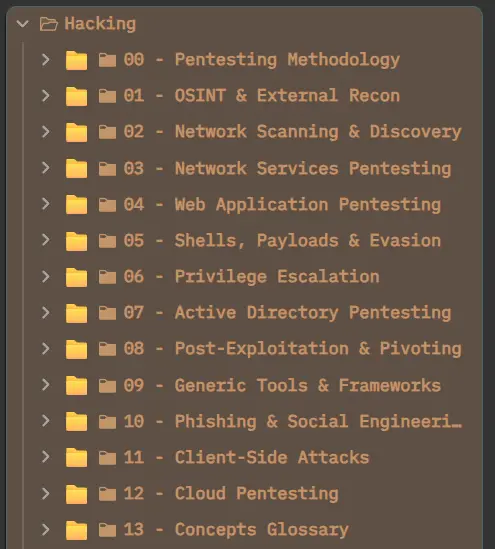
If you’re not sure how to actually write your notes, the post that made it click for me was Bruno Rocha Moura’s CPTS tips. Go read it.
Obviously I’m not telling you to copy my structure. Use whatever works for you, think about it, and I really recommend using git to push them to a private repo so they stay saved (you’ll often copy text straight out of the HTB or PEN-200 course, so to be safe, keep them to yourself).
Doing machines
After finishing the HTB course I started working through retired machines (the ones from TJ Null’s list), a few of which I later turned into writeups here. At the start, after all that studying, doing boxes for the first time just feels like being lost. You don’t know what to look at, you don’t know what could be a path, even though you studied a lot and did the course labs. It knocks you down a bit. But that feeling doesn’t last long. You just keep going, read your own notes, use HackTricks, and do your research.
And even when the urge is strong, don’t use AI. It would hurt you more than help. I only used it to understand what I was looking at, never to get solutions, just to figure out what a path might be or what I’d maybe missed, and always after hours of being stuck. You have to stay stuck. It’s normal. Getting past that wall is exactly when you improve, and you want to do it as independently as you can. It feels like you just hacked NASA. You’ll feel it too. So keep going and don’t stop.

After a bunch of machines, plus IppSec videos on others (which I strongly recommend watching as passive study), I decided not to buy the CPTS exam. I don’t really know why, I just felt way more ready for OffSec. And even though I’m sure the CPTS exam is very well made and gives you a lot of experience, I decided not to overthink it and bought the PEN-200 course with the OSCP+ exam.
Switching to PEN-200
From here on, the studying was a bit boring. I’d already seen a lot of it in the CPTS, so it was redundant. But I didn’t want to skip a single module. I did every single one, my completionism got the better of me.

I kept improving my notes with what the course explained, and I’m glad I did. Even though HTB’s material is really good for the CPTS and, in turn, for the OSCP+, you still have to study the OffSec course. You get what they’re looking for in a junior pentester, what you absolutely need to know, because what you study there will definitely show up on the exam. You have to understand their “Try Harder” mindset and roll up your sleeves.
Proving Grounds and the labs
After about two months I finished the course. I took it easy and spent more time optimizing my notes than actually studying. I had one month of course access left. Instead of jumping straight into the OSCP+ labs, I got a Proving Grounds subscription and ground out machines there (again, the ones from TJ Null’s list). After 10 to 15 boxes I started on the labs. I didn’t do all of them, I did Secura and Medtech, then I noticed I had some gaps in Active Directory, so I went back to Proving Grounds to do the AD machines. After finishing almost all of those, I moved on to the mock exams: OSCP A, OSCP B, and OSCP C.
I found them really easy. I actually remember searching around to check whether they were really like the exam, because it seemed strange. It’s not cockiness, and I don’t mean it in an arrogant way, I was just happy that all the machines I’d done had paid off, that my hours spent taking notes had actually been worth it (I used them on basically every single machine).
Then my course access ran out, the three months were up, and I booked my exam for June 18. Which I then had to move to June 24 because of health problems that showed up a week before. The bad luck.
Take notes on every single machine
In the days I had left, my Proving Grounds subscription expired too, and since I’d done more than half of the recommended PG machines, I resubscribed to HTB and ground out machine after machine there as well.
Here’s a super important thing I almost forgot to mention. On every machine I did, while I was doing it, I took notes. Notes on notes. Notes on notes of the box I was attacking. I was getting ready for the report I’d eventually have to write, so I needed everything written down, every vector I found, every piece of info I found, anything at all. I did it for every machine, no exceptions. I even built myself an Obsidian template for the notes on the boxes I attacked.
I got to more than 60 completed machines before the exam.
Exam day
On exam day, my advice is to have a Kali VM ready to go, with all the tools you use, clean, updated, and take snapshots whenever you can.
The exam is proctored, meaning that for up to 23 hours and 45 minutes you’ll have one or more people watching you over webcam, though they can’t hear you. This stressed me out more than the exam content did. Once I got through all the pre-exam setup they make you do (checking the room over webcam, documents, a script to see what programs you have installed, connections, and so on) I felt way too watched.
But then you get sucked in and you stop thinking about anything. You can take as many breaks as you want without waiting for approval, you just write it down, no reasons needed, they’re very relaxed about it. Sometimes I’d even forget I was being watched. Every time I found a flag I nearly threw my chair across the room out of pure joy. They probably thought I was insane, but whatever. It was fun.
After about 5 to 6 hours I’d already hit the 70 out of 100 points you need to pass. I went really slow, took several breaks, some even 30 minutes long, and I organized my meals (meal prep for lunch and dinner, quick snacks, a Monster if I was tired).
I decided to keep going anyway, and the standalone machines were pretty hard. Two of them had chained attacks just to get a system shell. After about 10 to 11 hours I’d reached 90 out of 100, with all my notes ready, marked up properly, with screenshots of almost everything. I decided to end my exam and go to sleep, partly because I still wasn’t in great physical shape (I’d only started feeling better one or two days before), and I wanted to give my best on the report the next day.
Aim higher than 70
Getting more than 70 points matters a lot. They won’t tell you your final score, they don’t care about it, but the extra points are useful because if you get something wrong in the report (say they can’t reproduce a machine’s privilege escalation from your notes and steps) you risk losing points, and if you drop below 70 you don’t pass. So aim high.
The report
I wrote the report the next day with SysReptor, a really simple tool to use, and free if you use it with the OSCP+ template (which they already have ready for you). There’s a hosted version, but I ran it self-hosted on my own machine. That keeps all your exam data on your computer, so you stay clear of OffSec’s rule about not sharing exam material with third parties. After that it was just a matter of turning all my notes into a concise, highly readable report, with every step explained as clearly as possible, the vulnerabilities I found, and how I’d recommend fixing them.
Check how they want the report submitted (read the OSCP Exam Guide), how to save the files, and everything else. Take your time. Reread it a few times and it’ll be fine.
The result
After one business day I got the email saying I’d passed the OSCP+. I read it at night in Florence, on the way home with my girlfriend after the Linkin Park concert. I didn’t even have the energy to celebrate. I got home, threw myself into bed, and slept. The next day I felt light. I’d done it.

The stuff that actually moves the needle
I told you my story, now let me be a bit more useful and hand you the things that actually matter, the ones I’d tattoo on a beginner’s forehead.
Enumeration is the whole game. I know everyone repeats it and it sounds boring, but it’s true. Most people don’t fail because they didn’t know some exotic exploit, they fail because they didn’t look hard enough. And here’s the part people forget: you don’t enumerate once. Every time you get a shell, a password, or a new user, you start over from that new position. Got domain creds? Go back and enumerate the domain as that user. In Active Directory that’s basically the whole job.
Take Active Directory seriously, then watch it get easy. It’s the heaviest part of the exam and it’s mandatory, so you can’t skip it and just grind standalones. Get properly comfortable with BloodHound, Kerberoasting, AS-REP roasting, Pass-the-Hash, DCSync, mimikatz. The moment I found my own gaps here I stopped everything and drilled AD boxes until it stopped scaring me. And here’s the twist: once it clicks, AD becomes the easiest part of the whole exam, at least in my opinion. Whatever shows up is stuff you already saw in the course, nothing exotic, so it’s the most predictable piece of the puzzle. Put the work in up front and on exam day those points feel almost free.
Learn to pivot before the exam. You’ll need it, and Metasploit won’t help you here (more on that in a second), so learn a real tool. I used Ligolo-ng, and that article explains it far better than I could here. Set it up once on a practice AD set and it clicks.
Know the rules before you sit down. Metasploit can only be used on one machine of your choice, and never for pivoting. No automated vulnerability scanners like Nessus or OpenVAS. No AI. Read the OSCP Exam Guide before the exam, not during it. Losing months of work over a rule you never bothered to read would be a stupid way to go.
Good news: the buffer overflow is gone from the exam, so don’t burn weeks on it like people used to. Put that time into AD and enumeration instead.
Don’t marry a machine. If you’ve been staring at the same box for too long, walk away and hit another one. Fresh eyes on the couch beat two more hours of tunnel vision. Half my paths came to me while eating, not while glued to the screen.
TL;DR, if you skip everything else
I spent this whole post telling you my story more than handing you a clean list, so here’s the short version, the stuff I’d actually do if I were starting today:
- Take notes from day one, and take them well. Every machine, every command, every vector, screenshots included. Push them to a private git repo.
- Missing the basics? Do the HTB fundamentals, all of them.
- Go through a full path (CPTS is great prep), then grind boxes. TJ Null’s list is your friend.
- Enumerate, then enumerate again from every new position. Most fails come from lazy enumeration, not from missing some exotic exploit.
- Take AD seriously, it’s the heaviest and mandatory part, but once you learn it it’s the most predictable one. BloodHound, Kerberoasting, AS-REP, Pass-the-Hash, DCSync.
- Learn to pivot with something like Ligolo-ng. Metasploit won’t do it for you on the exam.
- Stay stuck on purpose. No AI for solutions. That’s where you actually learn.
- Read the exam rules before exam day: Metasploit on one machine only, no automated scanners, no AI.
- Don’t waste time building a report template, SysReptor already hands you the OSCP+ one. Put that energy into taking clean notes on every box instead, and the report basically writes itself from them.
- Sleep, eat, take breaks. It’s a marathon. Aim well above 70 so one small report mistake doesn’t sink you.
Try harder. You’ve got this.
Resources
Everything I leaned on along the way, in one place:
- HTB Academy — CPTS / Penetration Tester path
- OffSec PEN-200 (OSCP / OSCP+)
- OffSec OSCP Exam Guide
- TJ Null’s OSCP-like list (NetSecFocus Trophy Room)
- TJ Null’s PEN-200 prep guide
- IppSec (videos + ippsec.rocks search)
- HackTricks
- Ligolo-ng for OSCP and beyond (pivoting)
- Proving Grounds
- SysReptor (OffSec reporting, self-hosted)
- Obsidian
- Bruno Rocha Moura — CPTS tips (how to write notes)